LiveControl can now be more simply installed using the provider installer.
Prerequisites
- You first need TouchOSC installed on your iPod/iPad. Purchase TouchOSC from the Apple Store for $4.99
- You also need the TouchOSC template editor from hexler.net in order to upload the LiveControl template to your device
- Make sure you are running at least Ableton Live 8.1.
- Connect your iPod/iPad to the same network as your computer using either a router or an ad-hoc network
- On Windows you need to install Bonjour Print Services if you dont have iTunes installed
- Download the LiveControl installer for Mac or Windows
Configure TouchOSC
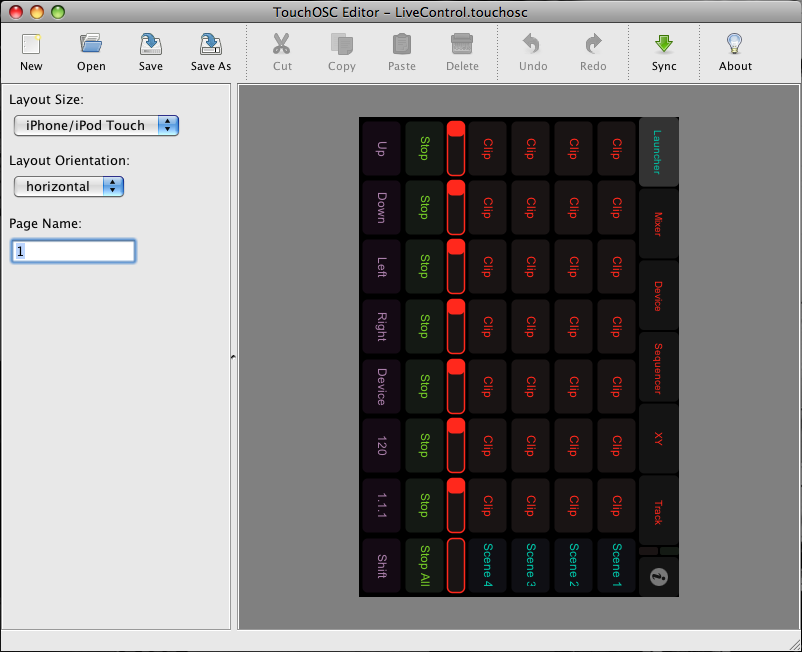
- Open the LiveControl template for TouchOSC (either LiveControl.touchosc or LiveControl_iPad.touchosc) in the TouchOSC editor.
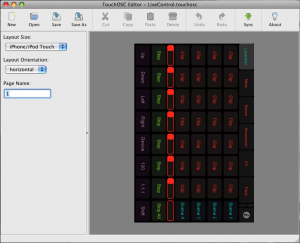
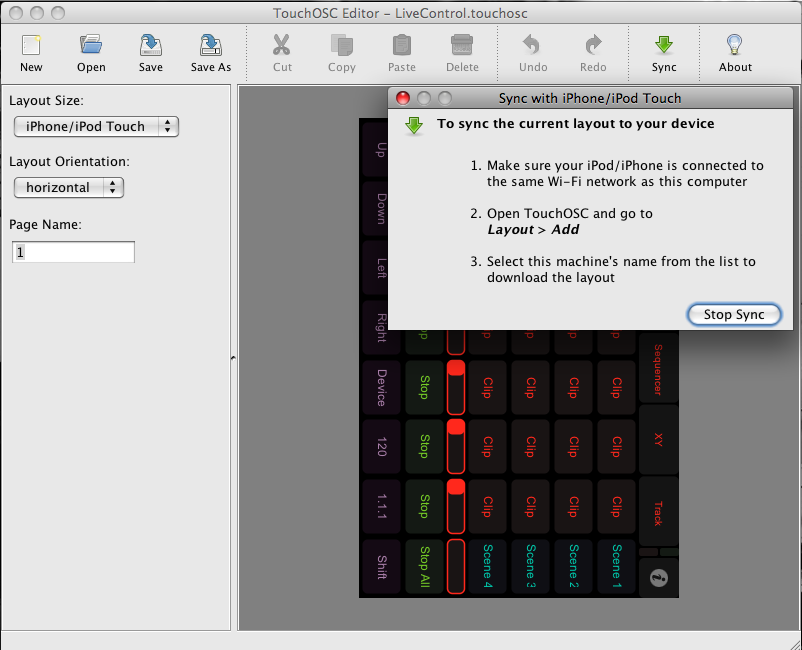
- Upload to TouchOSC using the Sync function
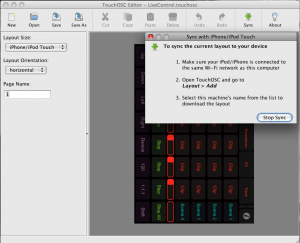
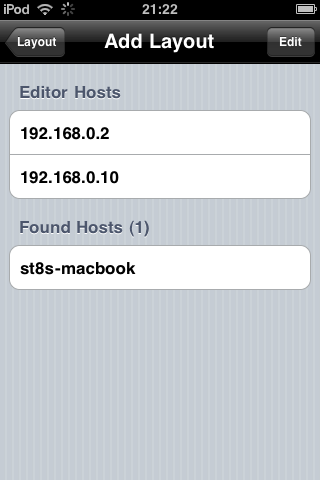
You computer should appear in the list of hosts, select it to upload the template:
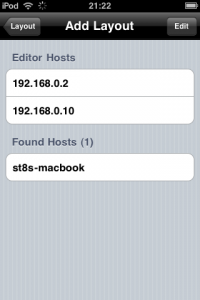
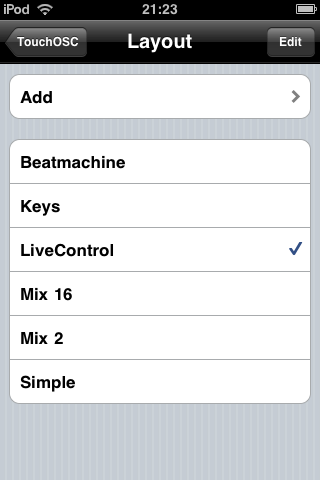
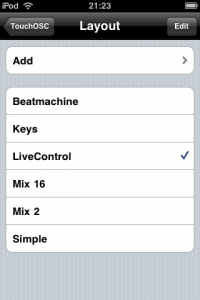
- Select this template inside TouchOSC (its called Livecontrol).
- Open the LiveControl installer application by double clicking LiveControl on mac or LiveControl/LiveControl.exe on windows
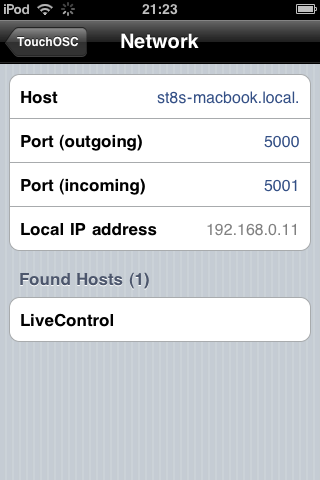
- Wait for 10 seconds, then select “LiveControl” from the “Found Hosts” section of TouchOSC’s Network configuration. Set the incoming port to 5001 (outgoing should be automatically set to 5000)
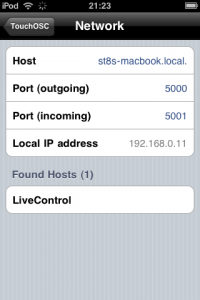
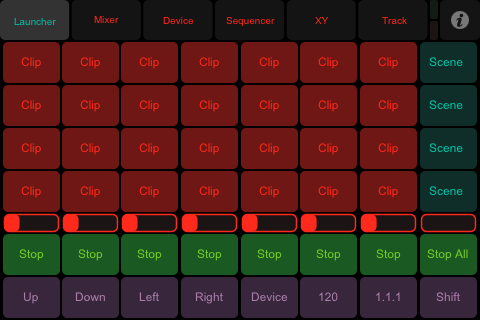
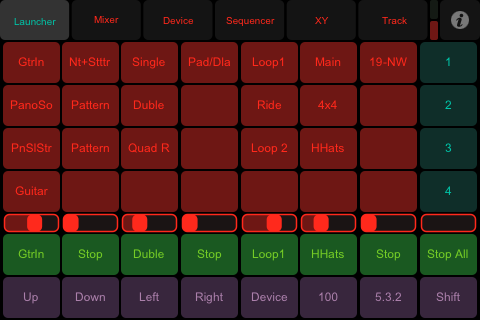
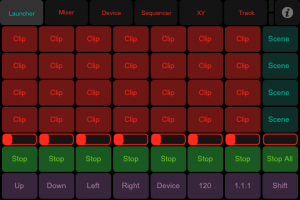
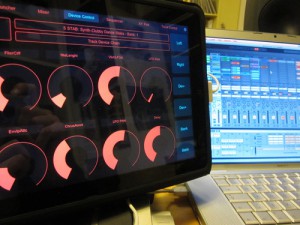
- Go back to the main TouchOSC screen and hit done to load the template. TouchOSC should look like the following on the iPod Touch:
Install and Configure LiveControl
- Run “Install LiveControl.rar”, this will install the MIDI Remote Script into your Ableton Live Directory. When prompted selected your Ableton Directory in the format Live x.x.x
- Copy the LiveControl.app (mac) or LiveControl folder (win) to your computer and launch the application, if you havnt already when configuring TouchOSC.
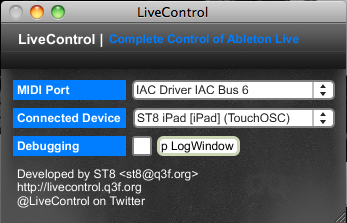
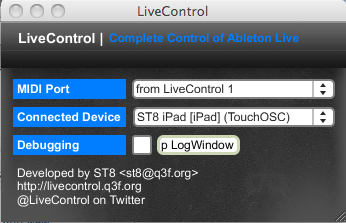
- LiveControl will detect any devices attached to your network. Select a MIDI port you would like to use for MIDI input. On windows, install MIDI Yoke. On Mac the LiveControl.app provides two midi ports (from LiveControl 1 and 2).
- Start Ableton Live and goto Preferences, then MIDI Preferences. Select LiveControl_TO from the control surfaces list. Leave MIDI In/Out ports empty. Make sure the MIDI port you selected above is enabled.
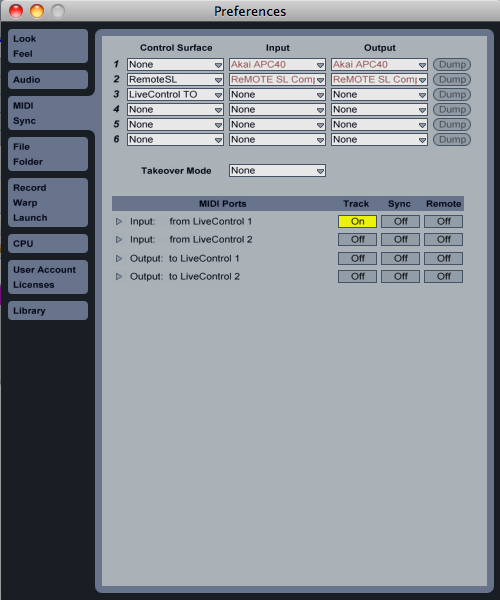
- The red (or another colour if its not the first MIDI remote script) selection ring should appear in Ableton Live and the template in TouchOSC should be updated

Change Log
- r132 02/09/2010 11:31
switched installer so livecontrol is installed in correct directory, other minor bug fixes - r131 16/08/2010 18:36
new router for much simpler setup, added clip colours and some view options in clip launcher - r130 26/06/2010 15:41
LiveControl_TO: Updated win installer - r129 26/06/2010 15:37
LiveControl_TO: Fixed bug in device control - r128 24/06/2010 17:07
LiveControl_TO: Finally updated windows installer to 8 track layout


hi
it s really a huge program !! great work !!
but i have a problem !
i have done all that you said but it doesn t work :
the red ring doesn t appear : what could i do to repair it ?
thanks
(python seems to work and i think the ip i put in the config txt are good )
Are you on windows or osx and where is python installed? If theres no red ring there is either a problem with python, or the program cant bind to the local ip address.
hi !
i am on W7 64 .
python is installed at C:/python25 …
and i have check again and again to my ip in the txt file and it seems i didn t do a mistake …
is there some test to know where the probleme should be between python and ip ?
thx
same for me here.. i am on win XP, ableton 8.0.1, python 2.5.1. is there a way to check if the python installation works fine ableton (apart from seeing the red ring)?
Are you on a 169.x.x.x ip range? Also can you try with the latest release of Ableton Live, i havnt tried it with pre 8.1. The config file is in C:\Users\your user name correct? I’ll test this on my windows 7 system when i get a chance
the ip are 192.168.1.22 and 192.168.1.20 …
i am on live 8.05 , maybe i should upgrade it …
how could we see if python work correctly ?
thx
( the config file with the ip are at C:\users\myname )
Maybe the simple process of uploading the template via TouchOSC Editor should be added to the installation description. It took me some time to figure out it works out when started with the sync-button within TouchOSC Editor. I found the path-descriptions rather confusing, too. “Right-click: Live.app -> show package contents” would be less confusing.
I am on OSX 10.6.3 and use an iphone 3GS as the remote-device and everything worked out when I did it exactly as described above.
Yes i agree about uploading the template. Its just assumed knowledge at the moment, ill make those instructions clearer. I’ll fix the bit about the path on mac too
hi i have mac osx SL 10.6.2 & ableton live 8.1.1 – i don’t use Osculator but the IAC driver.
I follow every step but at the end it works only 4 faders & 3 buttons.. why?
cheers
sorry another question.. why when i trying to sync iphone with touchosc to touchosc editor on mac, it seems like it takes a very long time for the sync.. !?
Hi !
Great work, congratulation !
Everything is working if I use an external wi-fi connection. But if I create a network with my mac and I connect the Iphone to it, there is some trouble.
The connection from mac/live to Iphone/touchOSC is OK but the connection from IPhone/TouchOSC to mac/Live is not working most of the time.
Any idea about this problem ? How can I connect my Iphone with touchOSC to my mac without an internet wireless connection ?
Thank
hi
maybe it gonna help – in livecontrol_to.txt i’ve set not my ip but deviсe name
in my way it looks like this
————————————
[LiveControl]
local = GogoMac.local.
remote = GogoPhone.local.
send = 5001
receive = 5000
ipad = 0
————————
the same thing in TouchOSC
I’m starting to go mad about this
I installed python, put the unzipped txt and directory where they belong and uploaded on ipad the template. When i select livecontrol_to as control surface what i should put as input and output? The networking works, if i open osculator and set it to listen on 5000 it recognizes all commands on the ipad (nav,fader even accellerometer), but i can’t understand how to make it work on ableton! What i’m doing wrong? All is in the right place and network is working… Plz help :*
Osculator should be closed before you open ableton. Osculator is not required for this to work. If you grab the latest zip (i changed some things last night) it doesnt need python to be installed either. Do you get the red box in ableton when you select the control surface? If not something is wrong with your ip settings in the config file.
connecting via ad hoc wifi…do i use the Wireless adapter’s IP address or the main computer internet card as the IP. that part confuses me.
It should be the ip of the wireless card if you are using an adhoc network
Ok thanks i fixed the ip issue! There’s only one lasting strange bug, in the clip matrix the buttons on the far right wich are assigned to: up down left right, stop all clips and shift gets the name from the first 6 scene names and actually became scene launch buttons! Even if i scroll down from another page (cant from clip matrix because the rename/remap issue) those buttons remain mapped to only the first four scenes. Am i doing something wrong?
hi i am using live 8.0.8 on vista and touchosc 1.4.2 on ipod touch OS 3.0. ableton can send sinals to the touchosc but touchosc cannot control ableton. any tips?
sorry, forgot to mention that the red box doesnt appear either.
@Lele
you need to install the new templates
@tz
You need to install Live 8.1 or greater, something changed in the api pre 8.1
Wow now it’s almost perfect!! Just a last mini issue, do you visualize track’s names in MIXER view? In clips view i have all the track names displayed but in mixer view just tr1 tr2 and so on. BTW excellent work!!!!!
I can get everything to work perfectly when I am connected to a network, but when I create a network with my Macbook Pro and connect directly with my iPhone, I can’t figure out the IP addresses for each. How do I find each device name so I can use that instead, like Gosha said previously?
Does the installer not show touchosc and hence its ip address? Get IP should list all your local ip addresses too:
mac installer:
http://monome.q3f.org/export/latest/trunk/LiveControl_TO/setup_src/dist/LiveControl_mac.zip
win installer:
http://monome.q3f.org/export/latest/trunk/LiveControl_TO/setup_src/dist/LiveControl_win.zip
great everything seems to work fine; is python still needed for live_control to work?
Just wanted to thank you for such wonderful work! Grabbed the initial version for my ipod a couple weeks ago after the CDM write-up…the updated version (114) is amazing! No issues setting up…the new ‘configuration’ window is a breeze.
My hats off to you!!! Thank you!
in step 2 – nothing shows up under “editor hosts” – is this where my problem is? Somebody please help me out —-!!!!! this looks awesome
I didn’t have Live Control installed. Once I did that, everything worked flawlessly!
nope, you dont need python installed anymore!
One thing that I've noticed while using an internal network (don't have an external wi-fi network where i'm at right now, so can't speak for that) is that you have to repeat the IP configuration process with each start up…including deleting the prior saved txt document with ip and port settings in your users library, for the internal network to work properly/completely, and thus allowing full bi-directional communication and control again. Am I right in this observation and does it make sense?
Thanks again!!!!!
I'm going to try and move the installer over to bonjour hostnames instead, so you wont need to configure the ips each time. The hostname shouldnt change between ip changes
I was just testing the new template and most of the buttons work, but a few do nothing: e.g., Scenes 1-7 (in Clip Launcher page), Start-Stop-Record (in Mixer page). Do these buttons work for anyone else?
ipad template i take it?
Yes, the iPad template.
Hi ST8,
Great work here!
Just a candid question, could you elaborate on why OSCulator should be closed?
I don't seem to understand why this should ask for trouble?
Cheers,
Cam
Hey,
There are some tips about connecting an iPhone or an iPad to your computer without using a wireless router on OSCulator's FAQ (http://osculator.net/doc/faq:iphone#iphone_ipad...). Those hints are not exclusively related to OSCulator so I think this might be of some interest to you.
Best,
Cam
Some people have been running osculator on the same ports as LiveControl. If OSCulator is started on the livecontrol ports, livecontrol wont be able to bind to it and wont work.
You're fine to run osculator on any ports other than 5000/5001 though
[...] Tutorial completo sobre a instalação e como fazer tudo funcionar: http://livecontrol.q3f.org/livecontrol/installation/ [...]
Magic!!!
good work!
what about personalising commands? i would like to pilot effects and other stuffs?
Pilot effects how? Device control gives you access to any effect?
I installed this on Windows and it took me a few minutes to realized that I needed to install “Bonjour Print Services for Windows”. I mostly use a PC so I wasn't sure what Bonjour was. Might be a good idea to add this as a note in the Prerequisites.
Once I installed that, everything worked like a charm. Excellent job and thank you very much for this!! Apple should give you some sort of commission since this is the main reason why I just purchased an iPad.
Wow, thanks for a great app! This just made TouchOSC->Ableton Live a reality for me.
I hope you add support for A/B selection by track and a crossfader… then this will truly be a viable alternative to the APC40.
Nice work.
You need to make sure Live is close when you run the intsaller, sounds like it hasnt overwritten your installation with the latest files. Try the latest installer and delete your LiveControl_TO folder before installing!
Ahh yes of course, id forgotten that from the instructions!
Ahh yes, crossfader is easy to add, but to which page?
I removed the old LiveControl_TO folder before installing, but when I ran the installer, it didn't install anything (even though the installer thinks it did). When I run Ableton Live, LiveControl_TO no longer shows up among my advanced control devices. I checked the MIDI Remote Scripts folder after installation and there's nothing in it related to LiveControl. Is the installer working with OS 10.5.8? If I reinsert the old LiveControl_TO folder manually, what missing elements do I need to add from the new installer?
windows or mac? when you hit install does it say: copying x.py….. etc etc? Wonder if i broke the installer
yes! great app! thanks. I used Ableton Live but i'm a vj, not a musician. do you think its possible to make some app like this but to work with vidvox's vdmx? its a vj program and work very fine with osc protocol. I used TouchOSC with vdmx but i want to assign every parameter, like in any other app, i guest…
anyway, thanx a lot. with live works really great!
cheers!
I need some help! I've followed the instructions to the letter, and installed Bonjour Print Services for Windows (Will someone tell me why this is needed? Bonjour itself is installed with iTunes, and we all have that!). Still, my iPhone doesn't appear in the “Automatic Configuration (Bonjour Services) box. What's going wrong?
P.S. No firewall, and TouchOSC works fine with PureData.
Also, When I select LiveControl in the “Found Hosts” section of TouchOSC, nothing happens, but the network activity icon (circular thing next to the WiFi icon) continually circles around.
Mac OS 10.5.8. When I start the installation, it indicates “copying x.py, etc.,” but doesn't actually install anything.
i personally do not have itunes installed on my windows box, if you dont you need the bonjour services.
have you loaded the template in touchosc? TouchOSC doesnt register the service until the template is actually loaded and running.
Selecting the found host “livecontrol” option just changes the host field, it doesnt connect or anything
Hello, thank you for the nice software! I have a little problem after all is installed. Ableton is showing the red box in session view and talking fine with TouchOSC but TouchOSC is NOT talking with Ableton. Any ideas? Everything is exactly as you say to install it. All ports are configured exactly as instructed. It is only that the remote does not talk to Live
Ableton freezes when I select “LiveControl_TO” in the drop down box for control surface… Tried a reinstall still no luck.
the installer wont work on my g5 powermac running 10.5.8
what version of live?
i need to check ppc compatability, not something ive tested.
exits on code 255..
is there anything I can do to help with the PPC testing?
same prob, osx 10.6 / ableton 8.1
if i try to browse to the live app folder, it is grayed out, if i copy the folder location it still pretends to install but there is nothing there…
any way I can manually install, I sooooo need this
I'm trying this on windows, and even though it says “installation complete”, the livecontrol_TO option isn't in the MIDI menu.
I've tried installing the LiveControl_TO folder somewhere else and just copy and pasting it into the MIDI remote scripts folder in Live, but whenever I choose it in the preferences menu, the whole thing freezes.
I simply cannot find the right directory or the installation simply isn't working
I have osx 10.6.3, live suite 8.1 (it was free…), and when I browse to select the live directory under applications, it is grayed out, even when manually inputing /Applications/Live.app it goes thru the motions of installing but I cannot find the LiveControl preset from the control surfaces.
Please advise I would def consider donating to the cause if I could get this up and running, and appreciate your hard work very much.
why don't you use a legit copy of live first.
erm it should be something like /Applications/Live x.x.x/ not directly into the Live.app. The program appends the path Live.app/Contents/App-Resources/MIDI Remote Scripts
what version of Live?
Live lite 8.1.3
i'll have to test this on Live Lite, not something ive tested!
I tried everything but the damn thing can't connect…
Always get tha same “connection failed! – Timed out” error in TouchOSC.
Don't use firewall or something.I can use TouchOSC's layouts with Ableton but can't load
LiveControl inside the presets..Could someone please guide me to this?
Here are the Network settings i've put in TouchOSC:
Host: 192.168.1.6 (my ethernet's local IP)
Port OUT: 5000
Port IN: 5001
Local IP address: 192.168.1.5
hi i got everything to work cept
the names in the clips won't show up in touch osc.
nvm with some tinkering i figured it out.
all i can say is thank you for releasing this
I noticed that once Livecontrol is install in the proper places. I noticed that THERE are NO IAC drivers. Is that the way it is supposed to be. Do i need the IAC Drivers. Basically can not control clips etc
you dont need the iac drivers for this to work, it doesnt have any midi input/output as such. Do you get the red ring when you select the midi remote script?
Hi – loving the program but seem to have found one small bug
I am used to using very large sets… on each channel as many as 32 clips, and maybe 16 channels. Live handles this without issue.
When I use LiveControl, initially everything is fine… I can hit the down button and drop down to the next block of 7 clips. However, if I try to go down further (to the next 7 clips), things go bad. Live continues happily enough but control is lost between LiveControl (on an iPad) and Live.
Any ideas? Am I doing something wrong or is LiveControl limited to 14 clips?
Many thanks
John
Can you enable debugging and start the log server then start Live. You should get some debug output you can email me.
Works ok with my liveset (8 tracks, 150 scenes or so). do you have non ascii characters in your clip names?
TouchOSC when i select LiveControl_TO in Ableton updates, i see the song nabe, but i can't control them!!!
In ableton i don't see under MIDI ports any configurations, just everything empty..
Can someone help me??
do you have a firewall running?
No firewall and no firewall security activated within the router either.
You can try an ip in the TouchOSC network settings instead of a hostname. Should be the same as the local computer ip in LiveControl config page
Everything works except I can't get the template to update in TouchOSC. The names keep showing Q2xpcA and stuff like that… Help !
make sure you have the very latest version of the TouchOSC editor. Redownload from hexler.net if needbe.
I have followed every step. Bonjour recognized my pc and my ipod. the ports are correct, i even synced the template up with my ipod. My last step is that my control surface is set to livecontrol TO. seems like it should work? wrong. no midi imput flash button
plz help
do you get the red ring when you select the control surface?
what needs setting up in Live's midi pref. to get the keys and drum pads working ????
I can't get my clip names to show either…what did you tinker with?
clicked on hexler.net…took me no where
Before I go through all this, owning the apc40…do I really need this app? I'm not being sarcastic btw.
just make sure live control see's the ipad in the automatic box. the way it comes up is once you hit done in the ipad setup, it should pop up.
I have followed all of the steps letter by letter, and when i select LiveControl under midi preferences in Ableton, i can see the name of the clips on my iPhone, but Ableton is not receiving any midi. When i tap on the iPhone the green light comes on. There is no red light. Please help! : (
Hi, I'm running Windows and have everything else working except for one small thing. I managed to get the drum pads and keyboard working one time, but only after clicking yes to a prompt that was asking me to allow the LiveControl software internet access. I've tried clicking the “Start Router” button again in order to use the pads and keys, but I am no longer getting a prompt from my computer to allow LiveControl access to connect. Is anyone else having this problem, and if so any solutions?
yes a number of users have reported this, i dont think the midi ports are being closed correctly. Try firstly closing the LiveControl app completely and reopening, if that doesnt help try rebooting. its possible the midi ports have been left open by a previous instance of LiveControl. I'm working on fixing this
Using IPs or bonjour names? Try IPs if using Bonjour names, sometimes TouchOSC cant find your bonjour host and so cant send data back to ableton
Brilliant bit of programming on this and think its amazing. does anyone know though if there is a button on it to turn loops on and off ?
and if not how i could add one ?
thanks for your help
there isnt at the moment, but its not difficult to add. Just have to work out on which template to put it
one other quick question, i seem to have a bug that when the clip names apear (they dont always?) for some reason it only fills the top 4 of the column of 7. the bottom 3 can activate those tracks, but it wont fill them with names. im guessing it has something to do with the red box on ableton only going around the top four clips and this is what moves down when pressing up or down.
any ideas what im doing wrong ?
thanks guys
ideally it would be most useful on the launcher page, although where is another matter. for me it would be more helpful then the time on the set, but guess some people find that more useful. would it still work if you had it at the bottom in stead of the 7th row of clips ? as you can always scroll down to the next lot ? ill leave it in your more then capable hands
Once again just want to say thanks for this, it really is brilliant !
you've not ticked “using an iPad” in the configuration screen
I have tried both IPs. The iphone seems to be receiving incoming messages( i can see the names of each clip), but when i tap on the iphone, nothing happens on my mac.
Got the correct hostname in TouchOSC? Tap the LiveControl entry in TouchOSC to set the correct host. Also do you have any type of firewall running?
Wonderfull app & great work !
Much appreciated !
Just wondering how one can save the presets on the XY pads
What do those save & load buttons do ?
Frits
Hi, Ive followed all the steps and checked over all my settings, everything seems to be right but it just wont work? Please help!
I'm using ableton live 8.1 in Windows 7 , after the LiveControll installation , I got that error as below , any one Help .!! Any solution ?
File “LiveControl.py”, line 321, in OnOscService
UnicodeEncodeError: 'ascii' codec can't encode character u'u2019' in position 4: ordinal not in range(128)
Just fixed this, gonna try and push out a new release this weekend
It is loaded win 1.18 instead of win 1.24 ?
not updated the windows installer yet, will try and do that tomorrow!
Everything works fine here except when trying to route I'm getting an error message that “could not bind to router touchosc port 5000″ and so TouchOSC doesn't wanna up update with the drum pads page. Any idea what's going wrong? Thanx!
after following the above instructions, and choosing start router for the drum pads, i get “ERROR: could not bind to router touchosc port 5000. i'm on mac os 10.6.4, live 8.1.3, using iac driver iac bus 2
Is it possible to have the internet connection coming from the ipod/ipad to a laptop?
i have exactly the same problem. all my other templates sync just fine. livecontrol always times out. any ideas?
[SOLVED] I've manage to solve this issue by uploading the template manually via SSH client WinSCP (Windows) or Cyberduck (Mac)…The trick to use these clients is to have a jailbroken iPhone of course.Thanks to ST8's solution you need to rename the “livecontrol.touchosc” to “livecontrol.zip” and extract the content to iPhones TouchOSC directory at the 2 template locations…
Hope that helps everyone having the same problem
dirkdirgler
this is the best thing ever! THANK YOU!
Download links don't seem to be working.
Does it make a difference if you use the 2G version of the iPad?
Thanks for fixing the links!!! )
shouldnt do
fixed
do you have something else running on those ports, osculator maybe?
just updated the windows installer
it saves the list of devices and their parameters that are currently mapped out to a text file. Then when you reload your live set, hit load and it'll restore all the mapped parameters. Only works for one set at a time though so not sure how useful this is at the moment!
The Port fields are gone in the LiveControl application. It shows both the local and ipad ip addresses….and everything is working but I cannot configure the router portion of the software. When I select enable router the ips don't default to 4000 they stay at 5000…and I cannot access the port fields anymore????
Great update! I could never get the drum pads and the keys to work but now they work like a charm. My only gripe is that, the device control page returns the wrong names for the parameters. It use to work but I think something went wrong maybe during the previous update. Otherwise, this things is really amazing. When you fix that I will donate again for sure. Keep up the work because you are change the way I work. Thanks
Don't know if it helps but I noticed that the labels are returning the wrong names. And the indicator for the control is returning the right info for the parameter it is controlling. So think you just need to fix the labels. Hopefully this makes it easier for you. Thanks again. You Da Man!
you shouldnt need to change the port fields, though if you do hit “advanced settings”
yes ive finally reproduced this bug. fixing now
WOW that was quick!!! You are freakin' awesome. Btw love the enhancements to launch page and sequencer page as well as the cue and launch quantize controls. Pretty soon I won't even need to touch my mouse while using Live. Now, just two minor things, is there any way you can have the device page show parameters of devices inside a drum rack. Secondly I like how you added a volume slider to the launch page but do to its size its a little hard to use. I think a track activate button would be slightly more useful. Just my opinion on that last one. Otherwise you have single handedly built the best controller for Live. I am sure you got the guys at Jazzmutant worried
hello,
I downloaded the latest versions, and it does not work.
when I open touchOSC, I add layout. but it displays “connection failed”
I'm really tried everything
if someone could please explain step 1 for me I would be one step closer to coming back from this insanity…. I literally can not open the editor? does touch osc need to be running on my iphone??? wtf… i'm pulling my hair out over here!! I open the editor and nothing comes up.. no window.. nothing!!
ahhhhhhhhhhhhhh
d/l the editor for the 4th time and it just works… BRILLIANT!!
so it wasn't me or st8.. it was either my mac or for some reason the d/l on last friday was broken!!
THANKS A BUNCH!!
I beleive I just had the same issue. Does anyone know/can recomend the proper procedure for starting the whole setup over again? do I have to follow each step everytime I want to use livecontrol??
Hey whats the difference between the Live Controller and the Live Control Router set-up. The only app that I have is the Live Control Router set-up is this right?
I've followed your instructions and everything which I've done looks exactly as your screenshots. My iPod Touch shows up in the Livecontrol installer and all looks once again as the screenshots. However when I start Live (8.1.3) I get no livecontrol_TO listing in the midi control surface list. Any advice much appreciated.
have you gone through the install tab?
Yup, did the Browse to Live Directory thing, hit install. Would it make a difference if the Live directory is C:Program files (x86) as it's 64bit W7 system? That's the only thing which I can see which is different to your suggested setup.
Got it working. Pretty sure my computer was just being weird. Ran the installer again just now after my PC had been off all night, got the same messages but this time it just worked. Works absolutely great and is giving me a depth of control with live which the keyboard and mouse wasn't. I'll send a wee donation your way for some outstanding work
I have followed all of the directions for installation and when i load ableton with touchosc, my ipad recognizes my ableton session and all of the perimeters are preloaded like they say. however, ableton is not recognizing and midi data from my ipad when i touch it. In my midi preferences i am able to select live control however no midi ports show up like they do in the installation pictures. obviously my computer is recognizing my ipad it just isnt receiving any midi.
Any advice??????
Also, do i need osculator to be on
When ever I try to select the “LiveControl TO” in MIDI preferences, my Ableton Live freezes. I am running 8.1 on Win 7. In order to see LiveControl in my MIDI list I had to install it to a temp directory and then move the files to the Ableton program director. Any advice would be appreciated… can't wait to use this!
did you ever find a solution to the freezing issue when selecting LiveControl_TO from the Ableton list?
I had problems with Windows firewall. see my comment here (July 2, 2010 / 12pm):
http://hexler.net/to-infinity-and-beyond
I also had to allow ports 5000 and 5001 to UDP traffic otherwise I got no communication between TouchOSC and LiveControl.
I've followed everything in the installation files, i'm running ableton live 8.1.1 a REAL copy, when i go to select LiveControl from the midi control surface list live just freezes, im running windows vista 32 with ports 5000,5001 all open what is going wrong!? Please help me…
On Windows XP, Live 8.1 I've got it working (without router) by opening ports 5000, 5001, but it's really slow to react, even to mouse actions, any idea why? Also I can't get the router part to work yet, even with Windows firewall disabled. I'm not using midiOx, I have something called IPMidi which should do the same job.
Select “Use IP adresses instead of bonjour names” and then reselect your ipod/ipad from the automatic configuration tab. Seems to be issues resolving the bonjour names on some windows installations. Maybe windows firewall is blocking bonjour?
If you're not receiving any data from TouchOSC to ableton then either, the hostname selected in TouchOSC is wrong, or you have a firewall running which is blocking incoming traffic.
You dont need any midi ports unless you want to us the keys/drums page. Most of the scripts talks directly to ableton and does not need midi to functions.
Ahh hadnt thought that windows firewall was blocking the TouchOSC editor. Cheers for that!
Sounds like the same issue as other people, the bonjour hostnames aren't being resolve. Selec “Use IP Addresses instead of hostnames” and reselect your device from the automatic configuration list
you can try using ip addresses instead of hostnames.
can you also try upgrading to 8.1.3? there were some issues on 8.1 i think
Thanks, I'll try upgrading if you think that'll make it more reactive. Do you think the bonjour hostnames are also something to do with it being slow? Other news, I got the router working with loopbe1 a free thing like MidiOx but much simpler http://nerds.de/en/loopbe1.html
Thanks again for a great product, Phil
nope 'fraid thats not helped :S
Keep getting an error message, could not bind to port?
Is it possible to integrate a crossfader for djing?
Works like a charm on my MacBook and with an iPad.
Thanks for that, great work!
i have one, and i'm considering selling it. for real.
Works like a charm, I'll try setting up a ad hoc server as there seems to be some slow reactions on my iPod touch (not constant latency, more like occasional dropouts)
but yeah, I solved the freeze issue with IP instead of bonjour names, that worked for me as well.
thanks so much for that, it's insane to have so much control for this price.
Cant get Router/Midi to work. When i enable router, it breaks my touchosc config. I'm using Live 8.1, MBP 13 + iPad.
It was working perfectly, and then i lost the communication from live to the ipad. Tried to change ports, no change. my firewall is off, i am just so sad : it was so great when it worked !
hey there, love this app! so looking forward to getting it up and running correctly. I can do everything just fine except when it comes to the router. I have followed the instructions exactly, and my settings appear to be the same that you have in the instructions. Again, everything works but the pads and keys. Then, when I am on the router page, i save configuration and then start router, I too get the “ERROR: Could not bind to router touchosc port 5000″. I have nothing else running that I am aware of. I dont use osculator so thats not it. Any ideas? Also, where is the donate button for this app?
So when I reach the point when I'm supposed to go to the install tab in LiveControl and Browse to find the Live Directory, The Live Icon under the list of applications is greyed out and I can't choose it to install, any suggestions
Thanks! I am now using IP addresses instead of the bonjour names and all works perfectly.
It needs to be pointed to the application folder which should be at “C:Program FilesAbletonLive 8.1″. If it runs successfully you will see a “LiveControl_TO” folder in the following location “C:Program FilesAbletonLive 8.1ResourcesMIDI Remote Scripts”. If you do not see this folder, you can manually create it, then “install” LiveControl to a temp folder and move the files from there.
Does not appear to be working on a PowerBook G4 either.
After launch I get a LiveControl Error dialog box with this message:
LiveControl Error
An unexpected error has occurred during execution of the main script
——————–
ImportError: dlopen(/Users/adam/Desktop/LiveControl_mac/LiveControl.app/Contents/Resources/lib/python2.5/lib-dynload/wx/_core_.so, 2): Symbol not found: __ZN12wxAppConsole11FilterEventER7wxEvent
Referenced from: /Users/adam/Desktop/LiveControl_mac/LiveControl.app/Contents/Resources/lib/python2.5/lib-dynload/wx/_core_.so
Expected in: dynamic lookup
——————–
I got the exact same problem. 64 bit W7, won't show up in control surface list. Tried restarting, leaving it off, and all that.
On my 32 bit XP it shows up, and the touch recieves information from Live, but won't send any. I get the error which states something like can't lock on to ports. Also, the only thing that seems to transfer information from Live is the master fader, when I move it on the computer, it moves on the touch. Nothing else does.
The ports are open, firewires are open, I'm using ip instead of bonjour names, and I've tried anything I could find here. I promise a small donation when my grant arrives, if this could be solved…
Okey, so now I solved the Win 7, the problem was that darned administrator thing, when I manually copied the control surface folder from the installer and into the live directory everything started working. Guess that's the problem, have to run the installer as admin.
I'm having the same exact problem – I'm able to use everything but the drums and keys.
Anytime I press the “c3″ in drums I see the yellow midi note activation thing in Ableton Live but it's not hitting the drum instrument.
Anyone know what's going on?
This is really weird, i have the same problem. Its something to do with the midi port getting stuck open or something. Ive found the only way to fix it is to reboot. Still dont know whats causing this
Hi, Great App – very much looking forward to getting this going.
Have followed the instructions about 10 times and still keep getting the 'could not bind' error.
Any ideas? – I'm using an iPad with Output port 5000, Input 5001. 10.6.4, ableton 8.1.4 on a macbook pro. Also using IP addresses instead of bonjour names.
Thanks !
OK… I restarted the midi router in Livecontrol and now I'm binding ! The next problem is that the ipad doesn't seem to be receiving information from Live – ie no clip names or device data etc…
Would much appreciate some help !
Cheers…
Yes. That would be super helpful for me too…
i cant sync the live control preset to my ipod . presets i create myself upload fine but this one will not no matter what i do ….. any ideas?
hallo, bin ICH HABE IPAD und ich nich Krige Laufen Unter Win Vista danke!
Hi, I'm a little desperate here. I installed LiveControl yesterday and after some time I made it fully work. I could trigger the drum pads and play the keys and I was so amazed. However, when I launched it today, the drums and keys stopped to work even though they get the notes from Ableton and Ableton seems to receive the signal as a yellow dot appears in the top right corner every time I press a drum or a key. Any idea how to fix this one? Would be really glad to make it work again, it was hillarious…
guys, i have the problem, when I hit sync on laptop and trying to connect it it IPAD shows me – Conection failed, Timed out..
what should I do ?
Hi great program, having some real fun with it.. got a little problem the text does not appear in the i pad. any ideas would be great
sorted changed the receive port to 9000 for some reason 5001 wasnt sending back to the i pad
Everything seems to work – clips, volume etc – but for some reason mute, solo and arm don't. Any ideas. On the setup the IAC driver (touchosc) and (livecontrol in) and (livecontrol out) are not showing in Ableton.
Any ideas greatfully recieved
THIS IS AMAZING. THANK YOU!
hi,
first of all thanks for this amazing program! completely changed the way i work with live.
but i think you should amend the installation instructions since it can´t really be installed under a default installation of windows 7.
it requiers admin privileges to write to the folder it installs the midi extension to and without admin privileges it just fails silently (still giving you the “installation successful” message) and doesn´t write any files.
furthermore you can´t run the .bat file as admin because then it doesn´t find the .exe for some reason.
so the only way for me to install on windows 7 was so “install” to my desktop and then copy the installed files over.. after that it worked flawelessly
Thank you so much ST8
I tried the new version and it does not work, in Ableton I can read: “Error Could not bind to incoming ip/port. Check your LiveControl network settings”.
I tried both in Wifi and ad-hoc network and using the default port 5001 as in your tutorial but it does not want to work.
Thanks again for your hard work
Hi,
I add my thanks to the others here, very well done!
Have just updated to new version on mac 10.6.4
Live 8.1.3
TouchOSC 1.6
Live control 131
I see the oddest thing on the Clip Launcher page
As I press a clip say on track 1, they play the wrong track / clip????
So press clip 1 track 1 it plays clip 1 track 1
Press clip 2 track 1 it plays track 2 clip 2
Press clip 3 track 1 it plays track 3 clip 3
Also the clip names don't appear
On the mixer the Mute and solo buttons are mixer up but the volume sliders are correct
Also the drum pads and keyboard pages are fine.
Any idea what is wrong?
The keyboard and
IT WORKS PERFECTLY!!!
Thank you so much again for all of your hard work on this project!
are you using the very latest version of TouchOSC? Sounds like its not announcing your device type properly. Make sure you've got 1.6 installed.
Sounds like the installer has not overwritten you old LiveControl files. When you run LiveControl Installer.jar make sure the path is something like
/Applications/Live x.x.x and not /Applications/Live x.x.x/Live x.x.x
seems to append an extra path sometimes
the new installer automatically asks for admin privileges.
No LiveControl_TO in my control surface drop-down. MIDI input works for the keys and drum pads, but I can’t get the red box to show up or have any control of the session, etc. Please help!!!
MAC OSX 10.6.3 – Live 8.1.5
Same problem here. I updated live to 8.1.5 but live control does not appear on the list of controlers.
Great program!
Thanks in advance
MAC OSX 10.6.4
Live 8.1.5
Thanks so much for this great set up! Working almost perfectly….after spending a little time rechecking everything I seem to have things straight but, I am having the same problem: no drum pads or keys working. I too, am seeing the yellow indicator light in Live’s upper right. Am I missing something obvious? The only other issues I have is what appears to be the crossfader on the Launcher page doesn’t work and I don’t understand how the xy lock buttons and xy load/save work. Totally loving this, it would be great to get the pads and keys going too!
I just upgraded to LiveControl 2.0 and Live 8.1.5. I can’t seem to get Live to send any information to LiveControl. The drums and keys work fine in LiveControl, but not much else does. The cue rotary control works, and the master volume works, only it controls pan instead of volume.
Everything was working fine on the previous versions of everything, so not sure what’s going on.
It never fails…as soon as I post after seemingly trying everything I immediately realize I’m doing something really stupid!…like not having the device track in input!!! The other two issues do still stand though maybe I’m missing something obvious there too! Thanks again for this…it is superb!
It happened to me too, did you solve this problem?
I was originally having the same problems as you: Only keys and drums working, nothing else. Open up your Live package, then remove all the scripts currently in /Contents/App-Resources/MIDI Remote Scripts/LiveControl_TO. Reinstall and everything should work fine.
Not had a chance to run a full regression test of features, but my initial reaction is “WOW!!!” You guys have saved me months of frustration and an unneccessary learning curve. Time for me to just get on with the music! Install instructions work perfectly. Thanks to all the developers. Keep up the good work!
yep, this fixed it. don’t know why I didn’t think of it! thanks!
I installed everything, but LiveControl_TO doesn’t come up in Midi Prefrences
Got it working, scratch that
How? I’m having the same issue. Thanks!
[...] off, if you follow the instructions, (http://livecontrol.q3f.org/livecontrol/installation)its really easy to get up and running. I initially used my router’s network then went on to [...]
Hi ST8,
Running LiveControl on an iPad to Ableton 8.1 Suite in OSX 10.5.8 on a MBP.
I downloaded the live controller MIDI script but once installed the “Live.app” is grey and covered by a white circle with a line through it.
When I click on it a dialogue box opens and says; “You can’t open the application “Live” because it is not supported on this architecture.”
I can view package contents and can clearly see the LiveControl_TO file within but it is not coming up in Ableton’s MIDI preferences, presumably because the live app is not running or being recognised.
Do I have to upgrade to Snow Leopard to run the software?
Thanks for all your hard work on the app, love the look and feel, itching to get it all working.
sb
I have 2 questions
How can record a clip in to slot ?
How can I control crossfader on master channel ?
i’m having the same issue. i’m also running suit 8.1 in OSX 10.5.8 mac book pro
Thanks man fixed also my problem! Now i got colors hoorayy
Hi ST8
You made me buying an IPad.
I enjoy playing a lot, great work . But after ten minutes I lose connection and I don´t receive no more signal the green light is still on and I can still launch but no more info is send to the pad.
When I switch my pad off/ on it works again but only for ten minutes.
Questions:
Do I have to start live control every time ?
Why isn’t it possible to save in live control?
What can I do?
Is it a problem with my Network ?
Live 8.15
Live Control .
Thanks
soo
hi there !
i don´t get the **** drums and keys-page in touchosc … but the other stuff works fine !
i´ve tryed over 4 hours now – but it won´t work as is should.
got a win 7 system and i´ve done the things as described.
i don´t understadn the meaning of the touter in livecontrol in cunjunction with midi yoke.
which ports do i have to forward ? they should be different to the regular ones (5000 and 5001). I´ve tryed 9000 and 9001 but it didn´t work … pls , need some help
sick of playing the drums via keyboard ….
adition:
on the ipad, i do specify the “regular” ports of touchosc – means the function of the mixer, device, sequencer … ? or iss there no need to specify this ports ?
is that port the one for the pads and keys ?
sry guys, my english iss soo bad – hope, you´ll understand my problem …
Hi this is amazing but i dont understand how this:::
Run “Install LiveControl.rar”, this will install the MIDI Remote Script into your Ableton Live Directory. When prompted selected your Ableton Directory in the format Live x.x.x
where should i get this installed
i dont get the “LiveControl_TO”
i’m on a mac
thanks for some helps
I have the same problem, how did you get it working? one both my computers..
I am soooo close to getting this working…but something is broken. Live Control is receiving everything fine, it just cant send any data. When I launch a clip on the computer it plays on the phone, but when I try to play it from the phone nothing happens. I’ve got the red rectangle and one-way communication…I just need 2-way!
I’m on OSX 10.6 with Live 8.1.5…
I’m using ports 5000 and 5001…is there something else I need to be doing?
Cheers for the awesome work.
Yes. Please share how you got it to work!
Same problem here.
OSX 10.6 with LIVE 8.1.5
Using ports 5000 and 5001
Same problem here
Problem solved…………
Ive got fully deleted ableton live and istalled it again then installed livecontrol and everything works fine
Did you delete your whole Live library or just the application bit?
Tremendoooooooooooooo !!!!!
Muchas Gracias !!!!!!!!!
sam problem been stuck here for hours!!
try the latest update, hopefully fixed all these issues with the installer
[...] this is actually a little easier, (shock!), and again, the full installation details are at the Live Control installation page [...]